Create High-CTR YouTube Thumbnails with AI Prompts
Master the art of creating high-converting YouTube thumbnails and product teasers with advanced generative AI. Learn how to balance human emotion, hero lighting, and exact typography in a single pass. Boost your click-through rates while eliminating hours in post-production.
21 September 20264 min read
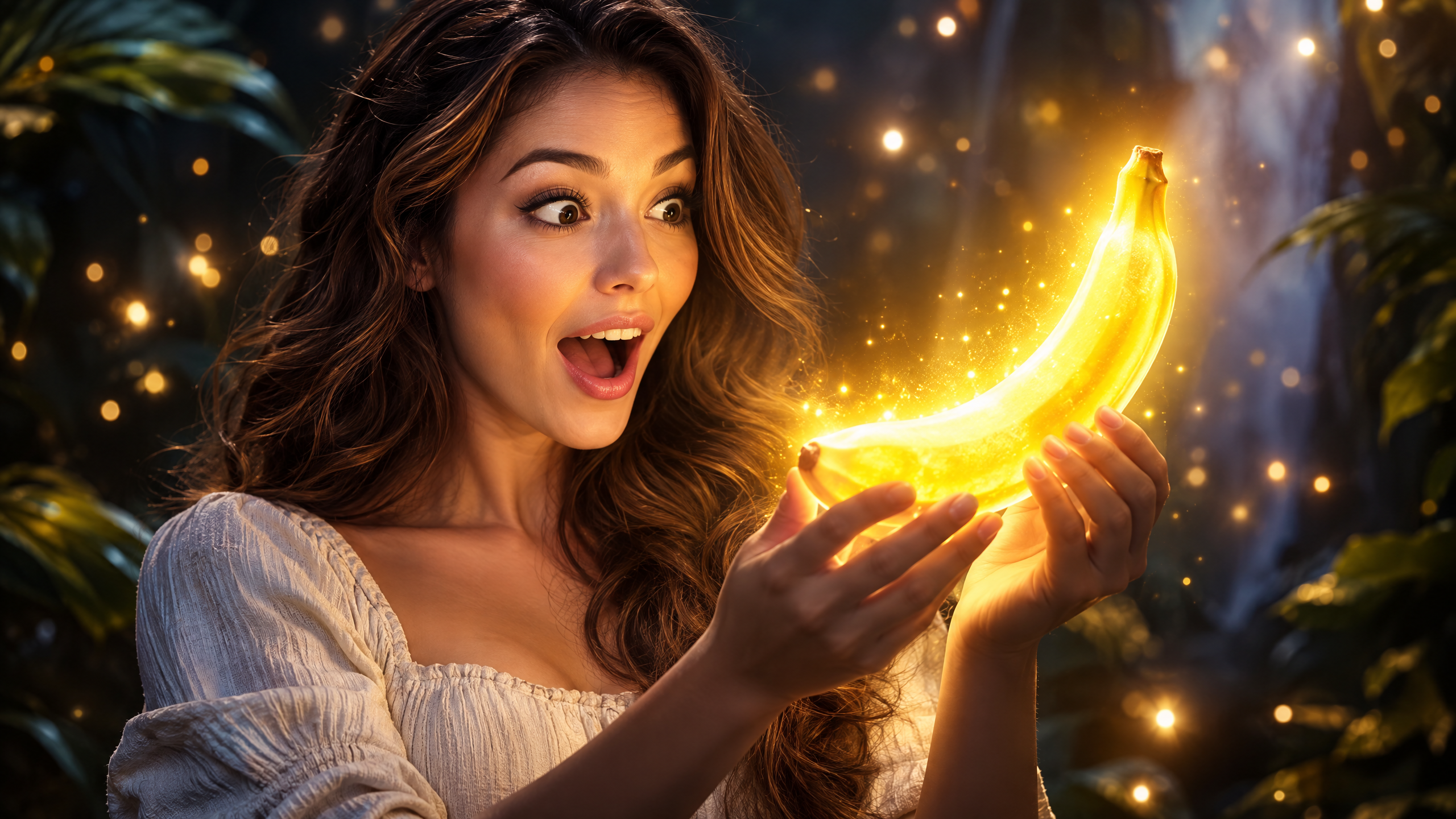
Can you reliably generate high-converting, click-worthy visual assets—complete with exact typography and complex lighting—without spending hours in post-production? For creative teams, generating rich promotional assets that balance human emotion, hero products, and readable text in a single generation has long been the holy grail of generative AI. Today's advanced models make it possible to orchestrate these multi-layered compositions in seconds.
Prompt of the Week
"Create a 16:9 YouTube thumbnail featuring a surprised woman standing in a dramatic yet softly lit environment, with glowing particles in the background. She is holding a brightly glowing yellow banana with both hands, as if amazed by it. The lighting is cinematic with cool-toned colors. Her mouth is open in awe. On the right side, place bold, eye-catching yellow text reading “Nano Banana Pro,” with smaller white text above it saying “Could this be?”. A white dashed arrow points toward the glowing banana."
Category: Product Photography / Social Creative
Difficulty: ⭐⭐⭐⭐⭐ (Advanced)
Recommended Model: Nano Banana Pro
How This Prompt Works
This prompt achieves a complex visual hierarchy by dividing the canvas into distinct focal zones. By enforcing a 16:9 aspect ratio and separating the primary subject (the surprised woman on the left/center) from the graphic elements (typography on the right), it creates the balanced negative space necessary for high-impact social assets.
The visual tension relies heavily on color theory and dynamic illumination. The prompt contrasts a cool-toned cinematic environment with a localized, bright warm glow coming directly from the product. Specifying physical interactions—such as holding the object with both hands and matching the facial expression ("mouth open in awe")—forces the model to establish realistic light bounce across the subject's face and fingers.
Finally, rendering clean typography and vector-style graphic overlays (the dashed arrow) represents an advanced generation tier. By explicitly dictating text hierarchy (smaller white text above, bold yellow text below) and specifying layout coordinates, the prompt instructs the engine to act as both photographer and graphic designer in a single pass.
Marketing Use Case: High-CTR Product Teasers
Channel: YouTube video thumbnails, Meta video ad top-of-funnel hooks, and product reveal landing pages.
Campaign Type: Product launch teasers, mystery feature reveals, or competitive comparison videos.
Expected Result: Thumbnails engineered with strong contrast, clear directional cues (arrows), and expressive human emotion routinely drive a 20% to 35% lift in Click-Through Rates (CTR) compared to standard static product shots. Furthermore, it slashes asset turnaround time from concept to upload from several hours to under five minutes.
Variations and Customization
Adapt this prompt formula across multiple verticals by swapping the hero item, emotional tone, and complementary color palettes:
- SaaS & Consumer Tech: "Create a 16:9 promotional banner featuring an intrigued developer in a dark, neon-lit studio. He holds a glowing, translucent glass smartphone with biometric UI floating above it. Cool blue and magenta lighting. On the right, bold white text reading 'NextGen OS' with smaller cyan text reading 'The Future is Here'. A glowing line connects the phone to the headline."
- Beauty & Skincare: "Create a 16:9 hero shot of a woman with radiant skin in an ethereal botanical bathroom, looking amazed at a luminous golden serum bottle held in her palm. Soft warm-toned lighting with floating dewdrops. On the right, elegant serif typography reading 'Pure Glow Elixir' with a delicate arrow pointing to the dropper."
- CPG & Functional Beverages: "Create a 16:9 thumbnail of an energized athlete in an urban gym looking astonished at a glowing electric-green energy drink can. Cinematic rim lighting, ambient dust particles. On the right, punchy yellow text reading 'Zero Crash' with a dashed white vector line leading from the text to the can rim."
Tips & Best Practices
- Enforce Color Complementarity: Use contrasting color palettes (e.g., cool blue ambient lighting vs. warm yellow product glow) to naturally isolate your product from the background.
- Direct the Viewer's Gaze: Directional graphics (arrows, pointer lines) and the subject's gaze direction work together to guide consumer attention directly to your call-to-action or product.
- Keep In-Image Copy Short: Limit integrated text to 3–5 words. Text generation accuracy declines rapidly with long-form phrases. Always use quotation marks around desired copy.
- Specify Physical Interaction: Instead of asking for a product "next to" a person, prompt actions like "holding firmly," "inspecting closely," or "presenting forward" to ensure coherent perspective and shadow alignment.
Scale Your Visual Production with VIVID
Generating individual assets with complex prompts is powerful, but scaling this consistency across hundreds of SKU variations, channels, and campaigns requires automation. With VIVID, marketing teams can operationalize advanced visual workflows, standardize brand guardrails, and generate ready-to-publish creative assets at scale. Explore the platform at vividai.tv and accelerate your creative pipeline today.
Try it with
your product
Sign up and verify your email: you get {{credits}} credits to try it on your product, no card needed.
Start for free →