AI Prompts for Isometric 3D Cityscapes
Transform standard location announcements into captivating, tactile 3D worlds. Discover an advanced AI prompt that generates miniature isometric cityscapes with integrated typography and dynamic weather.
24 August 20263 min read
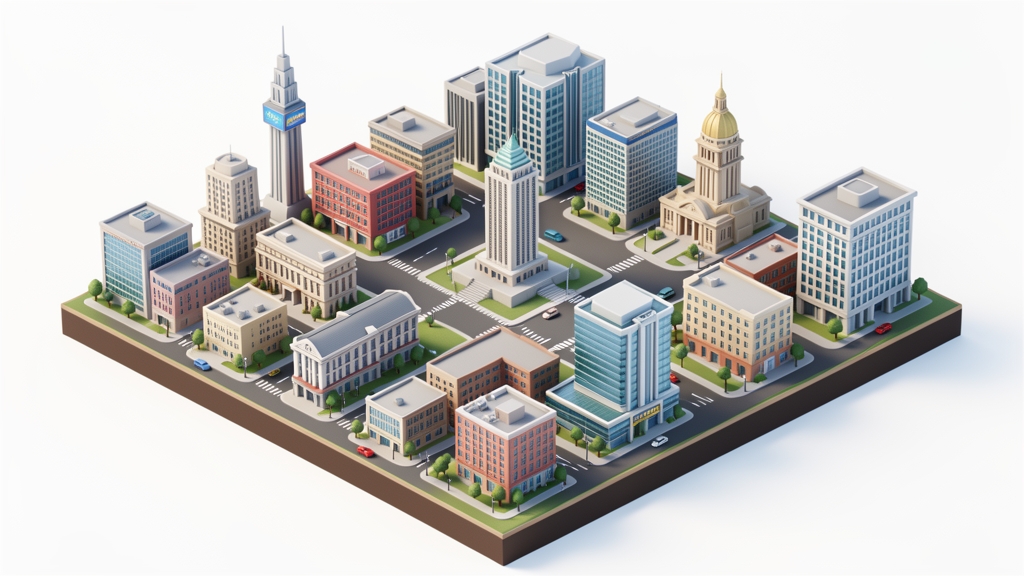
Are your location-based announcements getting instantly scrolled past? Whether you are launching a new flagship store, promoting a regional event, or sharing daily localized content, standard stock photos of city skylines are a guaranteed way to blend in. But what if you could transform any destination into a captivating, tactile 3D world that forces your audience to stop and look?
Today, we are breaking down a prompt that generates scroll-stopping, miniature 3D worlds complete with integrated typography and dynamic weather. This technique leverages the latest capabilities in AI image generation to produce highly stylized, agency-quality graphics in seconds.
Prompt of the Week: The Isometric Cityscape
"Present a clear, 45° top-down isometric miniature 3D cartoon scene of [CITY], featuring its most iconic landmarks and architectural elements. Use soft, refined textures with realistic PBR materials and gentle, lifelike lighting and shadows. Integrate the current weather conditions directly into the city environment to create an immersive atmospheric mood. Use a clean, minimalistic composition with a soft, solid-colored background. At the top-center, place the title “Paris” in large bold text, a prominent weather icon beneath it, then the date (small text) and temperature (medium text). All text must be centered with consistent spacing, and may subtly overlap the tops of the buildings. Square 1080x1080 dimension."
- Category: 3D Miniatures
- Difficulty: ⭐⭐⭐⭐⭐ (Advanced)
- Recommended Model: Nano Banana Pro
How This Prompt Works
This prompt is rated as Advanced because it balances three complex AI generation tasks: specific spatial framing, material rendering, and precise typography placement.
First, the instruction for a "45° top-down isometric" view forces the AI into a strict architectural camera angle, creating that satisfying "diorama" feel. By requesting "PBR materials" (Physically Based Rendering), we instruct the model to simulate how light interacts with real-world surfaces like matte plastic, clay, or frosted glass. This is the secret sauce that prevents the image from looking like cheap clipart, giving it a premium, tactile quality.
Finally, the prompt tackles in-image typography—a feature that only top-tier models handle well. By explicitly dictating the visual hierarchy (large bold title, icon, small date, medium temperature) and allowing the text to "subtly overlap the tops of the buildings," the prompt weaves the graphic design elements directly into the 3D environment, eliminating the need for a separate pass in Photoshop.
Marketing Use Case
Imagine you manage social media for a global retail brand or a boutique travel agency. You can use this prompt to power a daily or weekly "City Spotlight" campaign on Instagram and LinkedIn.
Instead of posting a generic photo to announce a new store opening in London or a flash sale in Tokyo, you post a bespoke 3D miniature of the city reflecting that day's actual weather (e.g., raining tiny 3D droplets in London). The result? A massive increase in engagement and shares. The unique visual style acts as a thumb-stopper, while the integrated text delivers your key information instantly.
Variations and Customization
You can easily adapt the core mechanics of this prompt to fit different industries by swapping the architectural elements:
- Fashion: "Present an isometric 3D miniature of a high-end luxury boutique, built out of oversized designer handbags, spools of silk, and gold hardware. Replace the city name with the brand name 'LUMIÈRE'..."
- Food & Beverage: "Present an isometric 3D miniature of a bustling street food market, where the buildings are constructed from giant noodle bowls, sushi rolls, and steaming bamboo baskets. Replace the weather icon with a spicy chili icon..."
- Tech & SaaS: "Present an isometric 3D miniature of a futuristic data center, featuring glowing servers, neon microchips, and holographic charts. Replace the temperature text with 'System Uptime: 99.9%'..."
Tips & Best Practices
- Keep the background solid: A clean, minimalistic background is crucial. It ensures your typography remains legible and gives the 3D miniature room to breathe.
- Be specific with landmarks: If the AI struggles to recognize a smaller city, replace [CITY] with specific visual cues (e.g., "Austin, featuring the Capitol building and a miniature Congress Avenue bridge").
- Embrace the weather: Use the weather integration strategically. A sunny, vibrant aesthetic works for summer promotions, while a moody, snow-covered miniature is perfect for holiday campaigns.
Stop settling for flat, uninspired imagery. Visual marketing is evolving rapidly, and the brands that master these generative workflows are the ones capturing consumer attention. If you are ready to scale this kind of high-end, customized content across your entire marketing strategy, discover how to automate your creative processes at VIVID.
Try it with
your product
Sign up and verify your email: you get {{credits}} credits to try it on your product, no card needed.
Start for free →