Are your product visuals telling the full story, or just scratching the surface?
In today’s scroll-heavy digital landscape, static images often fail to convey the complex, data-rich features of a product or service. Consumers and B2B buyers alike want to know how things work, but presenting technical specifications can easily look like a boring textbook. Enter the "augmented reality overlay"—a visual technique that transforms a standard photo into a highly engaging, data-driven infographic. Let's look at how you can generate this F1-broadcast-style analysis to elevate your visual marketing.
Prompt of the Week: The AR Technical Overlay
Category: Video & Storyboard
Difficulty: ⭐⭐⭐⭐⭐ (Advanced)
Recommended Model: Nano Banana Pro
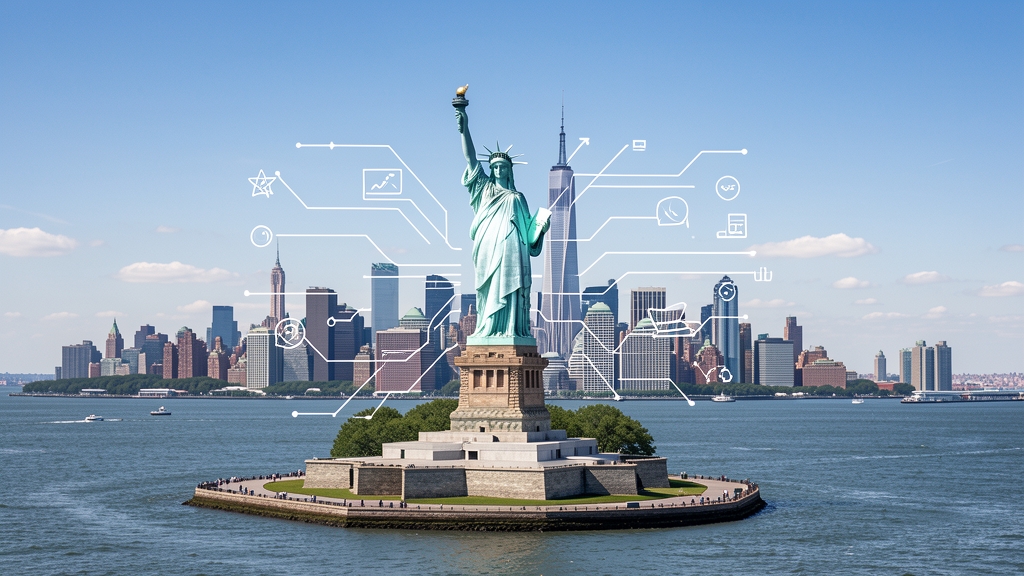
A photorealistic wide-angle landscape shot of the Statue of Liberty with the New York City skyline and harbor in the background. Superimposed on the scene is a white, hand-drawn augmented reality technical overlay. Features include: 1. Sketchy white leader lines pointing to key details like the "Torch," "Crown Rays," and "Copper Shell" with handwritten text labels. 2. Large dimensional vertical measurement arrows indicating the total height from ground to torch. 3. Small floating wireframe icons showing wind load data and material composition. Aesthetic: Structural engineering analysis, F1 broadcast graphics style, bright outdoor daylight, architectural blueprint overlay.
How This Prompt Works
This advanced prompt is highly effective because it explicitly separates the visual foundation from the graphic elements. First, it establishes a vivid, photorealistic base image—a wide-angle shot of a well-known monument in bright daylight. By securing the physical environment first, the AI has a solid anchor and realistic spatial depth to build upon.
Next, it layers on the complex elements using highly descriptive stylistic keywords. Terms like "hand-drawn augmented reality technical overlay," "F1 broadcast graphics style," and "architectural blueprint" tell the AI exactly how the text and data should behave. Instead of generating generic, blocky text, the prompt specifies the texture and feel of the graphics (white, sketchy, handwritten).
Finally, the prompt uses numbered lists to dictate specific overlay features, such as leader lines, measurement arrows, and floating wireframes. This structural clarity prevents the AI from blending the graphics into the background, ensuring the generated image looks like a deliberate storyboard frame rather than a chaotic rendering error.
Marketing Use Case: Behind-the-Scenes Product Teasers
This visual style is perfect for a B2B Tech, Automotive, or High-End Consumer Goods campaign. Imagine launching a new piece of hardware, like a premium e-bike, a smart home device, or even high-performance athletic wear. Instead of a standard lifestyle photo, you can use this prompt style to create "engineering analysis" graphics for LinkedIn carousels, website product pages, or Instagram Reels storyboards.
Expected Result: By combining an aspirational background aesthetic with technical breakdown visuals, you capture both emotion and logic. This builds immediate product authority, increases dwell time on your social posts, and drives higher engagement from audiences who appreciate craftsmanship and innovation.
Variations and Customization
You can easily adapt this blueprint overlay concept to different industries by swapping the main subject and the specific data points:
- Fashion & Apparel: "A photorealistic shot of a model wearing a high-performance winter jacket on a snowy mountain. White technical overlay with leader lines pointing to 'Waterproof Seams' and 'Thermal Core,' and floating wireframe icons showing heat retention data."
- Food & Beverage: "A macro shot of a gourmet multi-layer chocolate cake. Sketchy white AR overlay pointing to 'Dark Chocolate Ganache' and 'Hazelnut Crunch,' with measurement arrows indicating layer thickness and floating icons showing flavor profiles."
- Consumer Tech: "A sleek smartphone resting on a glass table. Blue glowing technical overlay in a sci-fi HUD style, with leader lines pointing to 'Titanium Frame' and 'Lidar Sensor,' including small wireframe battery life indicators."
Tips & Best Practices for Overlay Prompts
- Define the contrast: Always specify the exact color of your overlay (e.g., crisp white, neon blue, bright yellow) to ensure it stands out against the background lighting.
- Be concise with text: Keep your requested text labels incredibly short (1-3 words like "Copper Shell"). This minimizes spelling artifacts and keeps the layout clean.
- Reference existing visual formats: Borrowing aesthetics from other media—like "sports broadcast graphics," "architectural blueprints," or "video game HUDs"—gives the AI an instant stylistic shortcut for how data should be presented.
- Control the clutter: If the output looks too messy, reduce the number of requested data points. Sometimes a single measurement arrow is much more striking than five overlapping labels.
Bring Your Storyboards to Life
Complex visual storytelling doesn't require a massive post-production budget or weeks of graphic design work. By mastering advanced prompts like the technical AR overlay, you can instantly conceptualize and test high-end graphics that stop the scroll and educate your audience.
Ready to automate your visual marketing and scale your creative output without sacrificing quality? Discover how VIVID empowers marketing teams and agencies to generate, manage, and deploy stunning visual assets effortlessly. Step into the future of brand storytelling today.