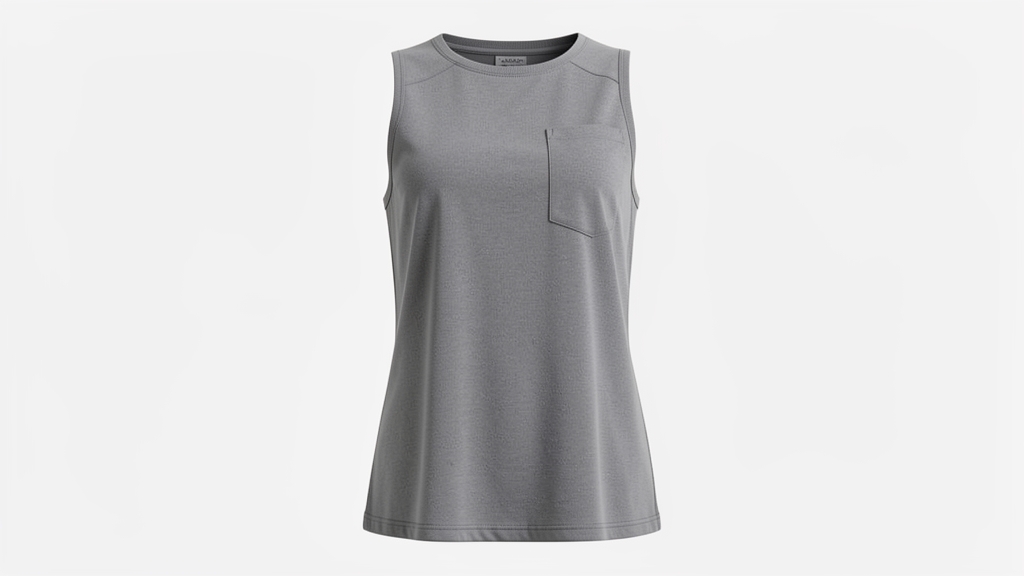
Tired of Expensive Product Photography Reshoots?
How much of your marketing budget is tied up in studio time just to capture those clean, white-background product shots? Lifestyle images are fantastic for building brand identity on social media, but your e-commerce catalog demands visual consistency. Transitioning a garment from a live lifestyle model to a "ghost mannequin" or flat lay usually requires hours of meticulous Photoshop clipping and retouching. But what if you could automate this extraction perfectly in seconds without losing the realistic shape of the product?
Prompt of the Week: The Ghost Mannequin Extractor
Category: Product Photography
Difficulty: ⭐⭐⭐⭐⭐ (Advanced)
Recommended Model: Nano Banana Pro
"Extract the clothing from [Image1] and present it as a clean e-commerce product photo. Remove the model’s body completely. Keep the outfit in natural 3D shape, with realistic fabric folds, seams, and textures. Display the garment as if photographed on a mannequin or neatly laid flat, centered on a pure white or transparent background. High-resolution, professional lighting, suitable for online fashion catalog."
How This Prompt Works
This prompt tackles one of the most notoriously difficult tasks in fashion e-commerce: preserving the three-dimensional integrity of a garment while completely removing the human form. By specifically requesting the AI to "Keep the outfit in natural 3D shape, with realistic fabric folds, seams, and textures," you are instructing it not just to mask out the background, but to reconstruct the interior volume of the clothing. This effectively generates a high-end ghost mannequin effect.
The instruction to "Display the garment as if photographed on a mannequin or neatly laid flat" gives the AI necessary context for the output format. It shifts the generation style from a generic digital cutout to a specialized commercial photography standard. Furthermore, specifying "professional lighting" and a "pure white or transparent background" ensures the final image requires zero post-production before being uploaded to your storefront.
Using an advanced model like Nano Banana Pro is crucial here. The complex interplay of shadows, highlights, and fabric drape requires a high-fidelity image generator capable of understanding spatial depth and material physics, rather than just basic pixel manipulation.
Marketing Use Case: Scaling E-Commerce Catalogs
Imagine you are a brand manager for a boutique apparel label. You just completed a stunning lifestyle shoot on the streets of Paris, but you lack the essential, distraction-free catalog photos for your product pages. Instead of booking a second studio day, you can run your lifestyle shots through this prompt.
Channel: E-commerce product pages (Shopify, WooCommerce) and Google Shopping Ads.
Campaign Type: Catalog standardization and dynamic retargeting ads.
Expected Result: A unified, professional storefront with high-conversion product images, achieved at a fraction of the traditional cost and time. This pristine, white-background format also ensures your Google Shopping feed gets approved instantly without algorithm rejections for background clutter.
Variations and Customization
While the original prompt focuses on apparel, the core concept of extracting a subject into a commercial product shot can be adapted across multiple industries:
- Fashion (Accessories): "Extract the handbag from [Image1]. Remove the model's hand and arm. Display the bag in a 3D standing position, highlighting the leather texture and metal hardware, centered on a pure white background with soft studio lighting."
- Tech (Gadgets): "Isolate the smartphone from [Image1]. Remove the lifestyle desk environment and hands. Present it hovering slightly at a 45-degree angle to show screen and edge thickness, with a subtle drop shadow on a pristine white background. High-resolution commercial tech photography."
- Food & Beverage (Packaging): "Extract the coffee bag from [Image1]. Remove all cafe background elements. Keep the bag looking full and upright with realistic foil reflections. Place it on a clean white background with crisp, even lighting suitable for an online grocery catalog."
Tips & Best Practices
- Start with high-quality inputs: The AI can only reconstruct what it can clearly see. Ensure your source image ([Image1]) has sharp focus on the product's textures, labels, and seams.
- Specify the fabric or material: If the model struggles with the drape of a garment, add specific keywords to the prompt (e.g., "heavy raw denim," or "sheer silk chiffon") to help the AI render the physical weight accurately.
- Direct the lighting: If your brand uses specific lighting styles, include this in the prompt (e.g., "softbox lighting from above," or "high-contrast rim lighting") to match your existing catalog seamlessly.
- Iterate on the neckline: The inside collar is the hardest part of a ghost mannequin shot. If the first generation looks flat, explicitly add: "Ensure the inside back collar and brand tag are visible and realistically lit in 3D."
Transform Your Visual Workflow with VIVID
Mastering AI prompts for product extraction can save your team countless hours of manual editing and thousands of dollars in studio fees. But you don't need to be a prompt engineer to get these professional-grade results every time.
With VIVID, our AI-powered visual marketing automation platform streamlines this entire process. We build these advanced parameters directly into intuitive, click-and-go workflows, allowing your team to generate flawless e-commerce assets at scale. Ready to revolutionize your visual marketing and launch campaigns faster than ever? Discover how at vividai.tv.